
For high-volume device buyers

Turn device intake
into a continuous flow.

ScanDex connects to your SickW account and turns the check → copy → paste cycle into a continuous intake flow. Every result logs to inventory and Sheets automatically.

Powered by SickW  ·  Free during early access  ·  No credit card

0+Devices scanned
$0+Inventory processed
0+Hours saved
scandex.app
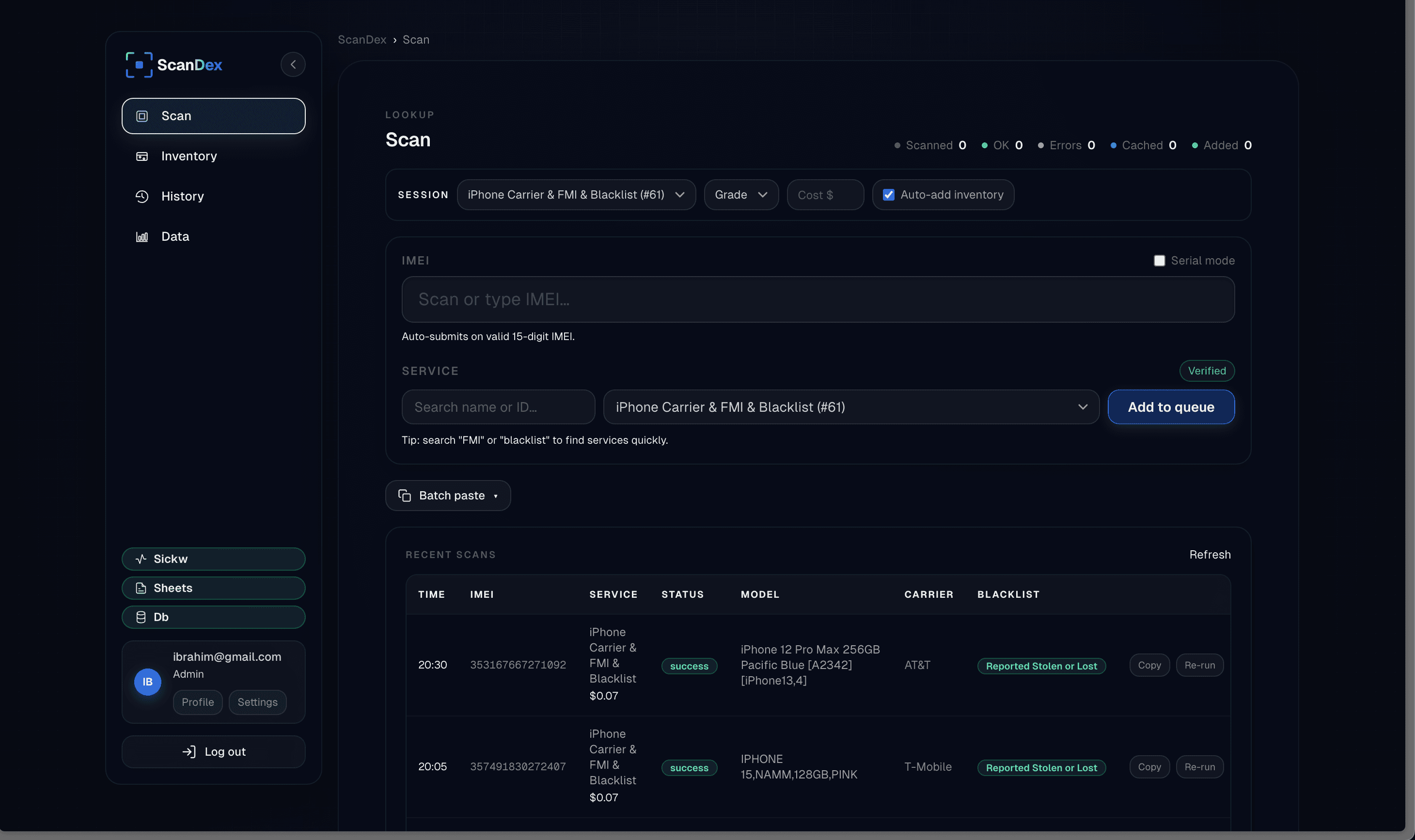
ScanDex — IMEI scan workflow
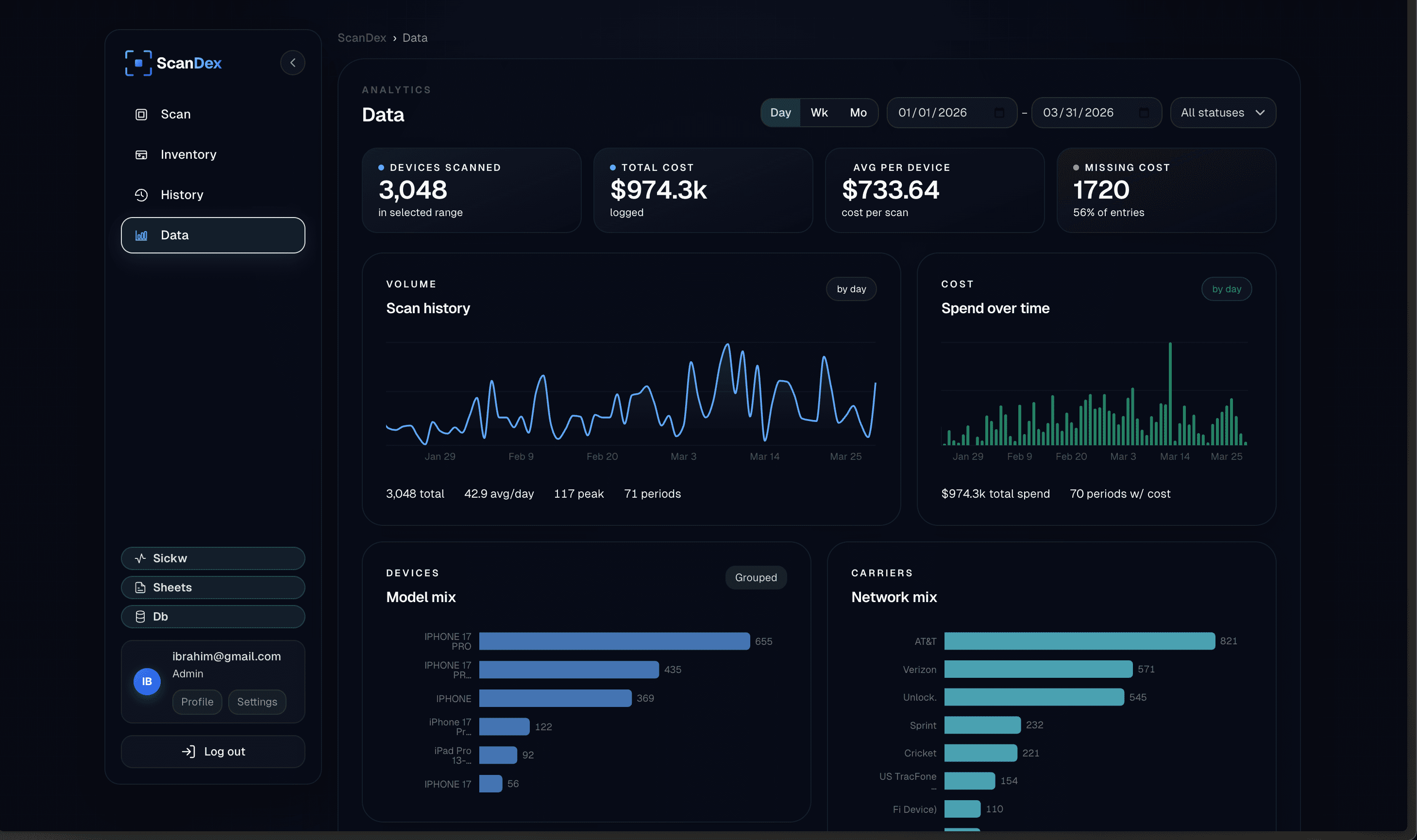
ScanDex — Analytics dashboard
The old way
ScanDex flow
The result

SickW. Copy. Switch tabs. Paste. Repeat.

Scan once. Check, log, and move on.

Structured records. Every device. Automatically.

Every device is a separate manual loop. One missed cell breaks the whole row. Every. Single. Time.

Continuous intake. No app-switching. No clipboard. Devices queue, verify, and log themselves.

Auto-logged to your spreadsheet and database the moment the check completes. Nothing to copy or paste.

SickW
IMEI Lookup Result
353512●●●●●●
CarrierAT&T
BlacklistClean
Find MyOn
MDMNone
Copy result
New lookup
⌘C
switch
⌘V
Intake Log.xlsx
IMEI
Carrier
Status
353512●●●●
AT&T
Clean
490123●●●●
T-Mob
860441●●●●
Repeat for every single device
scandex.app — Intake
Scan or paste IMEI…AUTO
353512●●●●●●AT&TClean
490123●●●●●●T-MobileClean
860111●●●●●●VerizonChecking…
358871●●●●●●UnlockedQueued
012345●●●●●●Queued
2 verified1 checking2 queuedlogged to Sheets ✓
Inventory — Today
5 devices
Model
IMEI
Carrier
Status
Value
iPhone 14 Pro Max
●●●●●●3512
AT&T
Clean
$820
iPhone 13
●●●●●●4123
T-Mobile
Clean
$440
iPhone 12
●●●●●●6019
Verizon
Clean
$280
Galaxy S23
●●●●●●8871
AT&T
Flagged
iPhone 14
●●●●●●1177
Unlocked
Clean
$590
Synced to Google Sheets · Logged to database

04 · What the team feels

Once records log themselves, the floor starts feeling calmer.

Once every result lands automatically, the whole intake flow gets faster, cleaner, and easier to trust across the team.

What teams are saying — then common questions.

05 · Operational clarity

The remaining questions get answered in the same flow.

It works with the scanners you already use, runs on your SickW account, and fits cleanly into the way your team already buys and processes devices.

06 · Ready to start

At this point, the next move should feel obvious.

If ScanDex fits your workflow, request access and we will help you get your intake flow live.

What teams say

I've been in this business for 10+ years doing everything manually. ScanDex saved me so much time and helped me avoid mistakes I used to make constantly. The audit trail alone is worth it.

Dallas Phone Buyer·1,500 devices/mo

Really excited to see someone finally bringing something new to this industry. We've needed innovation for a long time. Bringing AI and real automation to device intake is a big deal.

California Wholesale Operator·~30,000 devices/mo

Made my job so much easier. Way less manual work, fewer mistakes on intake. The whole process is just smoother now.

Dallas Intake Associate·50+ devices daily

Common questions

What does the scanning workflow actually look like?

Scan a barcode. ScanDex queues it, runs the SickW check, and logs the result to your spreadsheet and database — automatically. You never put the scanner down between devices.

I already use SickW manually. How is this different?

ScanDex sits on top of your existing SickW account. Same quota, same API key. It automates the part where you copy the result and paste it into a spreadsheet — that's the step we eliminate.

Does it work with barcode scanners?

Yes. Any USB or Bluetooth scanner that inputs into a field works. Scan a device and it queues and verifies automatically — no keyboard needed.

Get early access

Start verifying smarter.

Fill out the form — we review and send access within 48 hours. Free during early access.

Request Access

Requires an active SickW account  ·  No credit card required